get88 / Guides

11 websites for 88-day jobs in Australia

Compare 11 options for your 88-day job search: advertised vacancies, direct employer outreach and recruiter support. Choose the route that suits how you want to apply.

Start free applications100 applications in total, up to 5 a day. No card required.

Where to start

See all 11 options

For a broad vacancy search

SEEK

Compare advertised roles across industries and locations. Apply to the jobs that fit.

For vacancies aimed at travellers

Backpacker Job Board

Start with backpacker listings and a second-year visa jobs section.

For consistent outreach

get88

Up to 100 individual emails a day to regional employers for your 88 days, with your CV attached, from your own Gmail. Contact employers before they advertise a vacancy.

You can start using the Get88 Method for free. 100 applications in total, up to 5 a day. No card required.

Start free applications

A$49 AUD once. No subscription or renewal. Lifetime roster access and six-week campaigns, with manual restarts at no extra cost. Sending depends on employer availability and Google quota.

Compare at a glance

Select an option for the full review and sources.

Eleven websites and services for 88-day jobs, compared by useful fit and application method.
OptionGood fitHow you apply
SEEKJob boardBroad role and location searchesApply on SEEK or the employer’s site.
get88Automated job applicationsDaily regional employer applicationsSeparate Gmail emails, with your CV attached.
Facebook groupsLocal communitiesLocal leads and conversationsMessage the poster or use their contact details.
IndeedJob boardAdvertised roles across industriesApply on Indeed or the employer’s site.
Backpacker Job BoardTraveller job boardTraveller and backpacker vacanciesApply through your account or the app.
Farm Work AustraliaAgricultural job boardAdvertised farm vacanciesContact the listed employer. No account needed.
My88DayJobsDirectory and email draftsManual employer email batchesOpen a BCC draft, add your CV and send.
The 88th DayJobs and work-day recordsJob search plus work-day trackingContact employers or apply to live jobs.
88days.workEmployer directoryDirect contact researchCall, text or email employers yourself.
Back4WorkAdvertised email campaignsFarm-employer outreachCV and cover-letter campaign.
MLKA RecruitmentHospitality recruiterRemote and live-in hospitalitySend your CV to the recruiter; approve referrals.

Which one fits your search?

The application process matters as much as the list of employers.

SEEK

Start with advertised vacancies

Start with SEEK if you want to compare advertised roles across towns and industries. Search by role and location, then read each employer’s requirements before applying through SEEK or an external application site. Your resume profile and supporting documents follow the route the employer uses.

Its strength is seeing what an employer is recruiting for, rather than starting with a contact list. You still make each application yourself, and an “88 days” search result needs checking against your visa’s specified-work rules. Use it alongside direct outreach when you want both advertised vacancies and employer enquiries.

get88 vs SEEK: full comparison

Sources: 88-day job search · Application data
get88

Keep direct outreach moving each day

get88 sends up to 100 individual emails a day to regional employers for your 88 days, with your CV attached, from your own Gmail. Choose it for consistent outreach, including before a vacancy is advertised. We check hospitality employer locations against the official 88-day work areas.

You can start using the Get88 Method for free. You get 100 applications in total, up to 5 a day. No card required.

Setup takes about five minutes with your CV ready. Add your preferences and CV, then connect Gmail; your email template is ready to use.

The paid Get88 Method is A$49 AUD once, with lifetime roster access and six-week campaigns at up to 100 a day. You can restart campaigns manually at no extra cost. Sending depends on available employers and Google quota. Coverage varies by role and town.

See how get88 sends applications and the founder examples

Sources: How it works · Current pricing

Facebook groups

Ask about work in a particular town

Use local Facebook groups when you want leads and conversations tied to a town, hostel or work community. Read the post, check who is advertising and follow their instructions: that may mean Messenger, an email or an external application link. Provide your CV through the requested route.

Groups can give you local context and a place to ask practical questions before travelling. Each post stands on its own, though; a group name or a comment does not verify the employer, role or visa eligibility. Confirm the duties, pay and location directly with the employer before making plans around a post.

get88 vs Facebook groups: full comparison

Sources: Facebook group posts · Local job communities

Indeed

Broaden your advertised-job search

Add Indeed when you want another place to search advertised roles by industry and location. Some listings accept applications on Indeed; others send you to the employer’s site. Use your Indeed profile or upload a CV, then follow the requirements of that application route.

For applications on Indeed, employers see an Indeed email alias. Replies reach Indeed Messages and your email inbox, so check both as you follow up. This is useful if you prefer applying to a published role, but it is a different workflow from sending applications through your own Gmail. Indeed has also tested Apply For Me in the US; its August update paused the automatic mode. Availability for Australian WHV searches wasn’t established. Read the listing rather than assuming a regional job counts for your visa.

get88 vs Indeed: full comparison

Sources: Applying for jobs · Indeed email alias · Apply For Me US test and update

Backpacker Job Board

Look for employers advertising to travellers

Choose Backpacker Job Board if you want advertised vacancies aimed at backpackers and working-holiday travellers. Its second-year visa jobs section gives you a focused starting point. Create a job-seeker account, add your resume and apply through the website or app.

Employers for jobs you apply to can view your profile and resume, then contact you directly by email or phone. Keep your profile current as you move towns or change availability. The traveller focus is useful, but a listing in a visa-related category still needs a duties and postcode check. Treat it as a source of vacancies, then assess the individual job.

get88 vs Backpacker Job Board: full comparison

Sources: Applicant FAQ · Job-seeker app · Second-year jobs

Farm Work Australia

Start with agricultural listings

Use Farm Work Australia when agricultural work is your main target. Browse the vacancies and apply directly using the employer’s contact details or instructions in each listing. Its FAQ says no account is required, so you can begin with the listing and provide your CV through the route the employer requests.

The focused subject matter makes it a useful place to look for farm roles without searching a general job board first. You manage each enquiry and follow-up yourself. Check the actual duties, location, dates and working arrangements with the employer; a farm-work label alone does not settle whether a job meets your visa’s rules.

get88 vs Farm Work Australia: full comparison

Sources: Application FAQ

My88DayJobs

Send a batch from your own mail app

Consider My88DayJobs if you want to browse employer contacts and listed jobs, then send email batches yourself. The public frontend we inspected opens a draft in your mail app with up to 40 recipients in BCC and a shared subject and message. You add your CV and send the batch from your chosen email account.

That removes some address copying while leaving you in control of the draft. It also means you prepare and send each batch manually. A scheduled daily send is not stated in the inspected workflow. Choose it for that mail-app workflow; see the difference below if you want separate applications sent each day after setup.

get88 vs My88DayJobs: full comparison

Sources: Product plans · Employer search

The 88th Day

Keep job search and work records together

Look at The 88th Day if you want employer discovery and live job listings alongside tools for recording your work days and payslips. Its public product page describes a directory, jobs and tracking features, giving travellers a reason to keep using it after they find work.

For the search itself, contact directory employers or follow the live-job application route. The sources we checked do not explain a scheduled daily application service or detailed CV handling. Its distinguishing feature is the connection between finding work and keeping records. Keep the underlying documents and check the visa rules yourself; a tracker is not an eligibility decision.

get88 vs The 88th Day: full comparison

Sources: Product features

88days.work

Build your own employer enquiries

Use 88days.work when you want employer contact details and prefer to make enquiries yourself. The directory’s workflow is to call, text or email employers directly. You choose the channel, write the message and provide your CV to the employer as needed.

That can suit someone who wants a conversation before sending a formal application, or who prefers to control each contact individually. The work of preparing, sending and following up stays with you. A directory entry is a starting point for an enquiry, not confirmation that a role is open. Ask about vacancies and the work involved before treating a contact as a job lead.

get88 vs 88days.work: full comparison

Sources: Employer directory

Back4Work

Investigate a farm-focused campaign service

Back4Work advertises personalised email campaigns to farm employers, including a CV and cover letter. Its advertised copy says replies use the applicant’s address. If you want help with farm outreach rather than individual vacancy applications, those are the features to ask about.

We could review the official page’s indexed copy, but its directly fetched page did not expose the sending workflow. We have not tested a campaign. The sender account and daily schedule are not stated in the material we checked. Before choosing it, ask how messages are sent, what you approve and where replies arrive. These are advertised features, rather than independently verified sending results.

get88 vs Back4Work: full comparison

Sources: Advertised farm campaigns

MLKA Recruitment

Ask a recruiter about hospitality roles

Consider MLKA if you want recruiter support for regional, remote or live-in hospitality work. Upload or email your CV to MLKA rather than starting with a list of employer addresses. Its job-seeker page says your CV is forwarded to an employer only with your approval.

The recruiter is an intermediary, which can suit travellers looking for help discussing a particular role. Your enquiries and CV first go to MLKA; this is a different process from applying directly to every employer yourself. Ask which roles match your experience, availability and accommodation needs, then check any proposed job against your own visa conditions before accepting.

get88 vs MLKA Recruitment: full comparison

Sources: Job-seeker service · Upload your resume

Set up once. get88 sends for you.

get88 sends separate emails from your own Gmail, with your CV attached, to regional employers for your 88 days.

  1. 1

    Choose work and locations

    Save the roles and regions that suit your search.

  2. 2

    Add your CV

    Get free CV feedback, make your changes and upload your approved version.

  3. 3

    Review the ready-made email

    Your template is provided. Edit it before you start if you want to.

  4. 4

    Connect Gmail and press Start

    Check your test email and CV, then start. get88 sends for you; you handle replies.

Daily applications or a BCC draft?

My88DayJobs opens a manual draft with up to 40 BCC recipients. You attach your CV and send the batch. get88 sends separate employer emails each day once you’ve approved your message and CV, connected Gmail and started applications. Choose by how much of the sending you want to handle yourself.

One search, two application routes

Say you want housekeeping work in Cairns. Your first decision is which employers suit your experience, dates and transport. Then follow the route each one provides. This is a worked example, not a current vacancy or a measured result.

  1. For an advertised role:read its duties and complete the requested form or job-board application. Answer the role's questions and tailor your CV. A separate introduction does not replace that application.
  2. For an employer with no advert: find its careers page or hiring contact and ask about your role and dates. Use the hospitality email template for a short introduction with your CV; do not assume the contact means a vacancy.
  3. If you choose get88: check coverage for your saved preferences, review the employers, approve your message and CV, and connect Gmail. Check a test email before starting the campaign. Free and the Get88 Method have different sending limits.
  4. When an employer replies: read what it asks for. Send a required form, discuss the role or arrange a call yourself. Keep track of employers already approached so the two routes do not produce repeated enquiries.

Explore Cairns employers and application steps or read the get88 setup sequence.

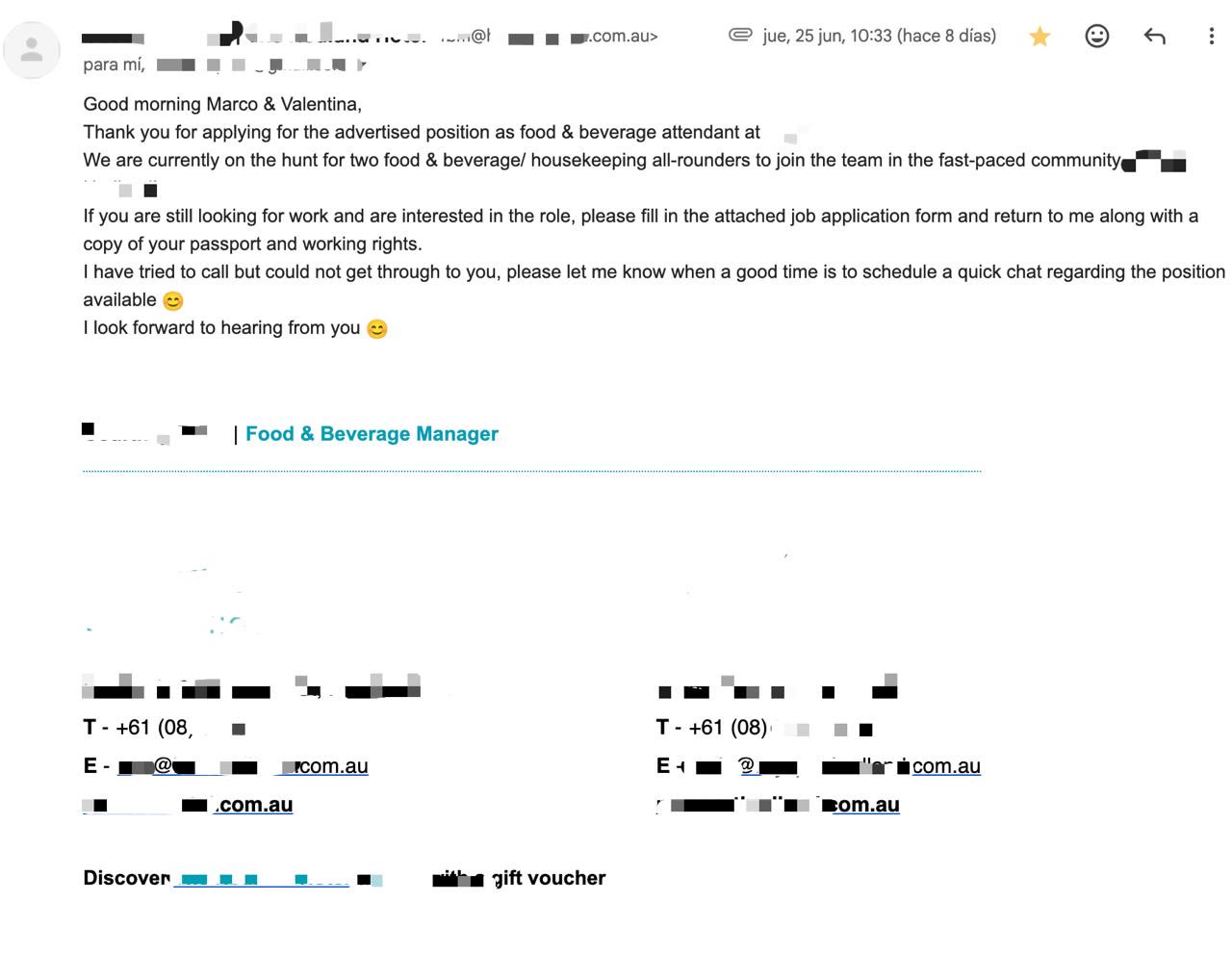
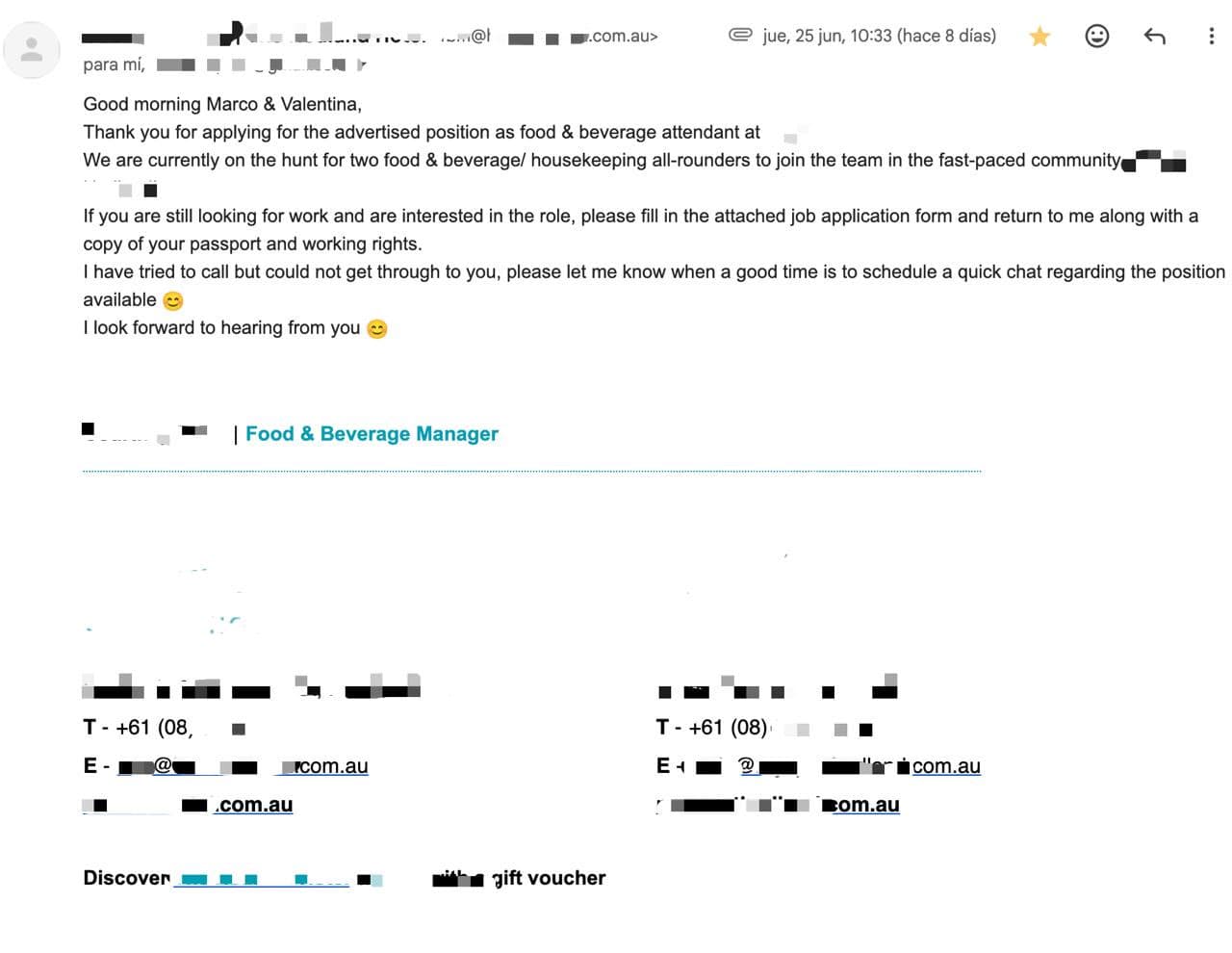
Redacted employer email asking Marco and Valentina to complete an application form and arrange a quick chat about two all-rounder roles.
Founder’s job-search example, already published on get88.

Founder campaign example

An employer invited the next step.

A manager thanks Marco and Valentina for applying to an advertised position, describes two food-and-beverage / housekeeping all-rounder roles and asks them to return an application form.

“please let me know when a good time is to schedule a quick chat”

The next step was to complete the employer's form and arrange the conversation. A direct email does not replace a form that an employer asks you to complete.

Open original reply
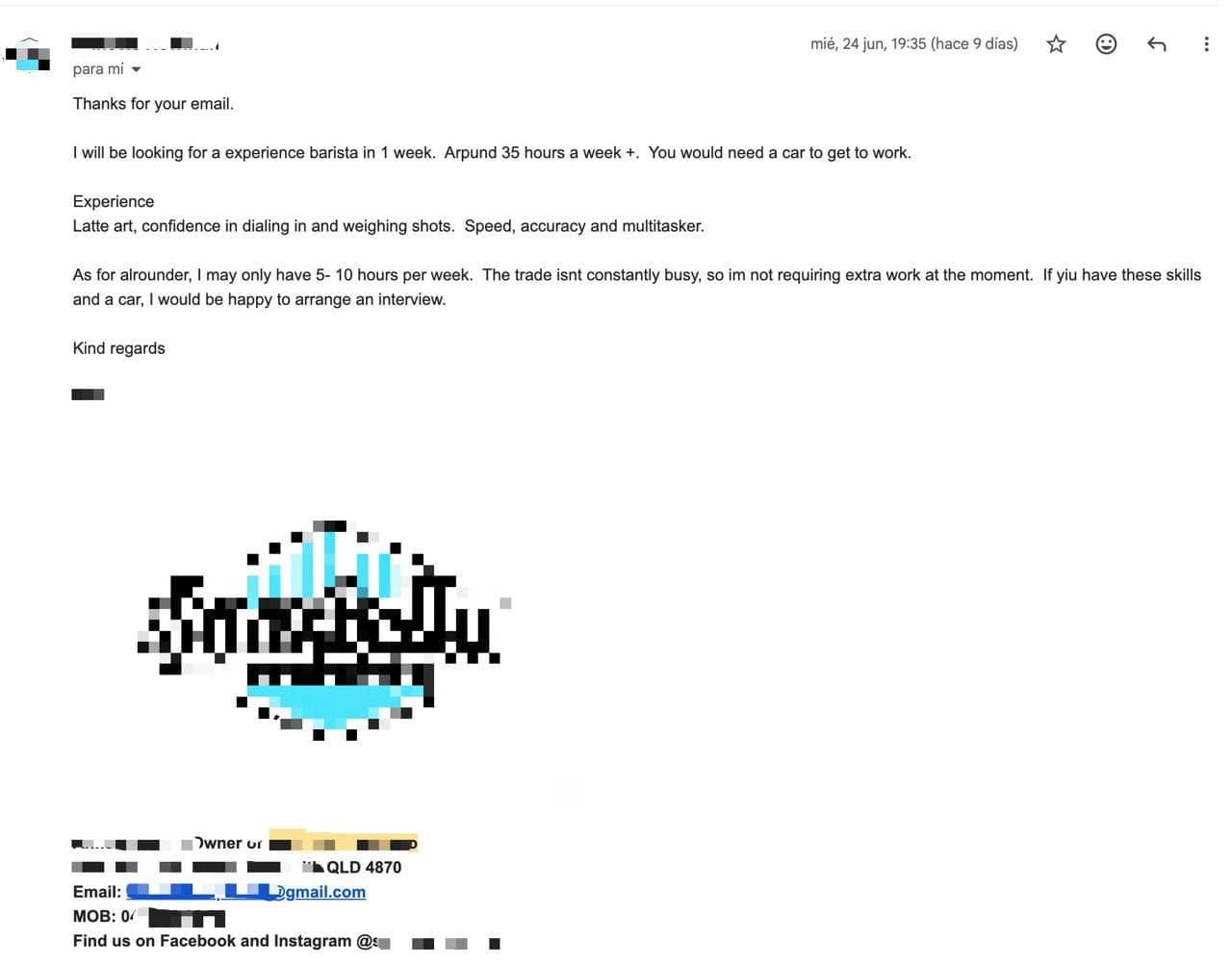
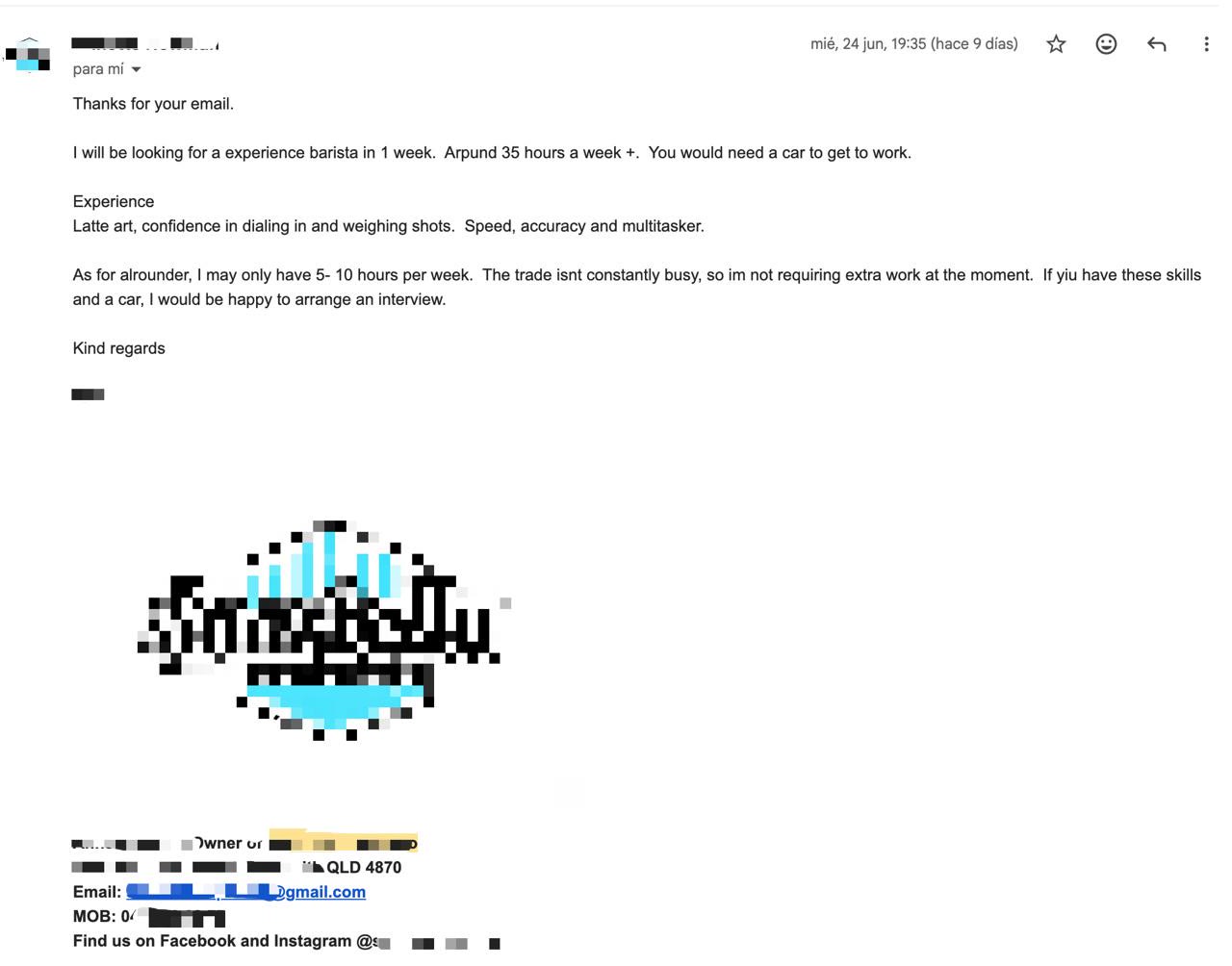
Redacted cafe reply describing barista skills, a car requirement and a conditional invitation to interview.
A second reply from the founder's job search.

The role still has to fit.

This cafe reply describes a barista role, including latte art, dialling in coffee and weighing shots. The employer also says a car is needed to get to work.

The employer was willing to arrange an interview if the applicant had those skills and a car.

That is a conditional invitation, not a job offer. The useful next step is to confirm the skills and transport requirements before arranging an interview. Application volume does not remove the need to match the role.

Open original reply

These are historical founder examples, not customer results or completed hires. They do not establish that today's get88 app sent the original applications or that these employers are hiring now. Reply excerpts reviewed 16 October 2026.

Use more than one route.

Search job boards for advertised vacancies, contact suitable employers directly, and use local groups for context. Track where you’ve applied so you can follow up without repeating the same enquiry.

We check hospitality employer locations against the official 88-day work areas. Explore get88’s regional-work pages or read the specified-work guide for role and visa details.

Before you choose

Job board or employer directory?

A job board lists advertised roles you can apply to. A directory helps you find employers to contact. Use the first for a stated vacancy and the second to ask whether an employer has suitable work.

Does an employer contact mean there’s a job?

No. A contact listing does not confirm a current vacancy. Ask the employer about available work, duties, dates and location before arranging travel.

Will the work count for a 417 or 462 visa?

Check the specific duties and postcode against the current Home Affairs rules for your subclass: 417 specified work or 462 specified work. A platform’s “88 days” label does not establish eligibility.

Do I need Gmail for get88?

Yes, for sending applications. Sign-in can use another email, but get88 sends through your connected Gmail and employers reply there. Read the setup guide before connecting it.

Is a BCC batch the same as daily sending?

A BCC batch is one draft addressed to several recipients; you attach the CV and send it. get88’s daily workflow sends separate emails after setup. My88DayJobs’ inspected BCC workflow does not state a daily schedule.

Published by get88, which is included in this guide and has a commercial interest in its own service. Competitor sources checked . Guide updated .

How we compared them

These are options for different workflows, not a measured ranking of hiring results. We checked public product and help pages on ; the sources are linked under each review. Back4Work’s description uses its official indexed copy because the directly fetched page did not expose its workflow.

We verified get88’s workflow against our current product and inspected My88DayJobs’ public frontend for the BCC draft behaviour. We did not send applications through the competing services. Where a relevant feature was not established, we say “not stated”. The founder replies are labelled personal examples, not customer performance data.

For get88’s current terms, see pricing and how it works.